Moodle Proctoring Plugin Comparison
Moodle proctoring plugins fall into four groups: native AI plugins (ProctorLink), the free open-source image-capture plugin (quizaccess_proctoring), lockdown browsers (Safe Exam Browser), and lockdown-plus-cloud or extension proctors (Respondus Monitor, Proctorio). They differ most on integration model, detection depth, review workflow, and where student data is stored. For high-stakes exams that stay inside Moodle and keep evidence on your own servers, a native AI plugin such as ProctorLink is the closest fit.
Schedule a DemoThe Six Dimensions Worth Comparing
Feature lists on vendor pages are long, but a Moodle proctoring comparison really comes down to six dimensions. Score each candidate on these and the differences that matter become clear quickly.
- Integration model: native quiz-access plugin, LTI, browser extension, or a separate portal. This decides how far students and reviewers leave Moodle.
- Detection depth: image-only capture versus AI events across camera, microphone, and screen activity.
- Review workflow: raw recordings a human must watch end to end, or a flagged-event timeline that surfaces only suspicious moments.
- Data residency: vendor cloud storage versus artefacts kept on your own Moodle server.
- Student setup: browser-only versus a required download, extension, or lockdown client.
- Proven concurrency: evidence at your peak cohort size, not lab tests with a handful of users.
This guide compares named options against those dimensions. If you are still defining what “best” means for your institution, start with Best Moodle proctoring plugin, then use the tables below to place specific plugins.
Named Moodle Proctoring Options at a Glance
These are the options most Moodle teams encounter, grouped by how each one connects, what it detects, and where the data lives. Capabilities change between releases, so confirm the current details with each vendor before you shortlist.
| Plugin / tool | Type | Integration | Detection | Data storage | Best fit |
|---|---|---|---|---|---|
| ProctorLink | Commercial plugin | Native quiz-access plugin. Proctoring is a per-quiz toggle; students stay in Moodle. | AI events: multiple faces, absence from camera, tab switching, ambient audio. | On-premise option. Flagged stills and logs on your own Moodle infrastructure. | High-stakes and large exams that need AI review and data control at scale. |
| Proctoring (quizaccess_proctoring) | Open-source community plugin | Native quiz-access plugin. Captures images inside the Moodle attempt. | Interval webcam image capture. No automated analysis out of the box. | Images stored in your Moodle database. | Low-stakes class quizzes that need a basic photographic record at no licence cost. |
| Safe Exam Browser (quizaccess_seb) | Open-source lockdown | Native quiz-access rule. Requires the SEB client before the attempt starts. | Device lockdown only. No camera or microphone monitoring. | No media captured; configuration and logs stay in Moodle. | Securing the device against tabs, copy-paste, and other apps, usually alongside a proctor. |
| Respondus Monitor + LockDown Browser | Commercial lockdown + cloud | Separate LockDown Browser client plus a cloud service; configured per quiz. | AI-assisted webcam recording reviewed in the vendor dashboard. | Session recordings in vendor cloud storage. | Institutions already standardised on LockDown Browser for all attempts. |
| Proctorio | Commercial browser extension | Browser extension linked to Moodle via LTI or a deep link. | AI events with configurable webcam, screen, and behaviour recording. | Vendor cloud storage with export access. | Mixed-LMS estates that want one extension across several platforms. |
The open-source plugin and Safe Exam Browser are both worth knowing well. The community proctoring plugin gives you free image capture, and Safe Exam Browser secures the device. Neither analyses behaviour on its own, which is where the commercial AI options differ. For how that automated analysis works, see What is AI proctoring?
Feature-by-Feature Matrix
The four categories behave differently on the dimensions that decide day-to-day cost and compliance. Read across each row to see how a native AI plugin, the free image-capture plugin, a lockdown-plus-cloud stack, and an extension proctor compare.
| Feature | Native AI plugin (ProctorLink) | Open-source plugin | Lockdown + cloud | Browser extension |
|---|---|---|---|---|
| Integration model | Native Moodle quiz-access plugin | Native Moodle quiz-access plugin | Client + cloud service | Browser extension via LTI |
| Student stays in Moodle | Yes | Yes | Launches a separate browser client | Extension overlay; may leave Moodle for LTI |
| Software students must install | None. Runs in the browser | None. Runs in the browser | LockDown Browser download | Browser extension install |
| AI event detection | Faces, absence, tab switch, audio | None. Image capture only | AI-assisted recording review | Configurable AI events |
| Reviewer workflow | Flagged-event timeline; judge suspicious moments only | Human scans captured images | Priority-ranked recordings in vendor dashboard | Flagged recordings in vendor dashboard |
| Data residency | On-premise on your Moodle server | Your Moodle database | Vendor cloud | Vendor cloud |
| Licence model | Subscription or credit packs | Free and open source | Institutional licence | Institutional licence |
| Proven high concurrency | 2,000+ concurrent (SPPU entrance grid) | Depends on your Moodle hosting | Vendor cloud scales; verify at your peak | Vendor cloud scales; verify at your peak |
Which Plugin Fits Which Situation
There is no single winner. The right plugin depends on exam stakes, cohort size, and your data rules. Use this quick guide to match a scenario to a category, then pilot the finalists.
| Your situation | Where to start |
|---|---|
| Occasional low-stakes class quizzes, tight budget | Open-source proctoring plugin for basic image capture inside Moodle. |
| You only need to lock the device, not watch the room | Safe Exam Browser, usually added on top of a proctoring plugin. |
| High-stakes or large exams, native Moodle, data control | ProctorLink for AI event review, flagged timelines, and on-premise storage. |
| Several LMSs beyond Moodle in one procurement | An extension-based proctor via LTI, accepting vendor-cloud storage. |
Many institutions combine categories: a lockdown browser to secure the device plus a proctoring plugin to watch the candidate. For the settings that reduce cheating before any plugin is added, see How to prevent cheating in Moodle exams, and for how automated and human oversight differ, see AI proctoring vs live proctoring.
Where ProctorLink Lands in the Comparison
ProctorLink is built as a native Moodle proctoring plugin rather than a separate portal or extension. In comparison terms that puts it in the native-AI column: proctoring toggles on inside the standard quiz settings, students never leave the LMS, AI flags integrity events during the attempt, and reviewers work from a flagged-event timeline instead of raw video.
- Inside Moodle: no second portal, download, or account for students.
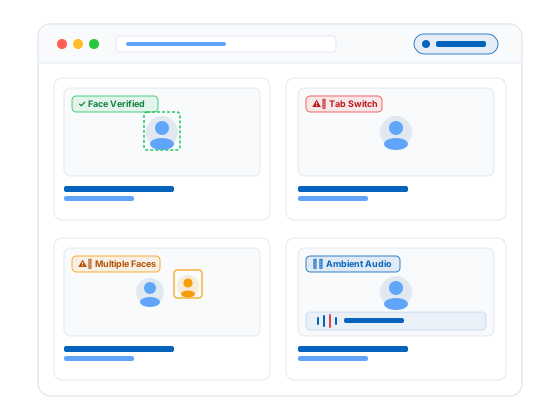
- AI-first review: multiple faces, absence, tab switching, and ambient audio flagged with timestamps.
- Your data: on-premise storage keeps flagged images and logs on your own infrastructure with retention you control.
- Proven at scale: published deployments at entrance-exam concurrency, not lab demos.
Published figures from ProctorLink Moodle deployments:
- SPPU ran 70 PG entrance papers for 12,000 students, with 15,205 proctored sessions and 2,000+ candidates online at once, mostly on mobile browsers.
- RT-MSSU kept flagged media on-premise while running AI monitoring to satisfy regulatory retention rules.
- Ashoka University secured high-stakes hiring exams with dual proctoring and on-premise video storage.
Across published deployments, ProctorLink has supported more than one million proctored exam sessions (methodology note below). More detail lives on the case studies page.
What customers say on G2
Institutions evaluating proctoring tools often look for independent feedback outside vendor case studies. ProctorLink is listed on G2, where Moodle administrators and training teams share verified product reviews.
Read ProctorLink reviews on G2 →Frequently Asked Questions
Sources & references
Deployment statistics and product behaviour described in this guide link to the sources below.
- SPPU case study: PG entrance exams at scale
- RT-MSSU case study: government compliance and on-premise retention
- NFTI case study: 60,000 fellowship exam sessions
- All ProctorLink case studies
- ProctorLink Moodle proctoring plugin on moodle.org
- ProctorLink reviews on G2
- ProctorLink Standard user guide (PDF)
- Privacy policy
Explore ProctorLink
Comparing Moodle proctoring plugins? See how a native AI plugin installs, what it costs, and where it is already running.
Schedule a Demo
See per-quiz proctoring inside your own Moodle in a 30-minute walkthrough.
View Pricing
Subscription tiers for steady exam cycles and credit packs for seasonal peaks.
Moodle Integration
Install guide, plugin download from moodle.org, and compatibility notes.
Best Moodle Proctoring Plugin
How to define shortlisting criteria before you compare specific plugins.
Case Studies
SPPU, RT-MSSU, and Ashoka University: integrity at university scale.
Prevent Cheating in Moodle Exams
The quiz settings that cut cheating before any plugin is added.
More Proctoring Guides
What is Online Proctoring?
Online proctoring supervises remote exams via webcam and microphone inside your LMS, logging rule violations with timestamps so reviewers judge flagged cases, not every session.
What is AI Proctoring?
AI proctoring uses machine learning to automatically detect suspicious exam behaviour such as multiple faces, tab switching, and absence from the camera.
Best Moodle Proctoring Plugin
A comparison of leading Moodle proctoring plugins for universities that need native LMS integration, AI monitoring, and institution-owned data.
Online Proctoring Software for Universities
How university exam offices choose online proctoring software for entrance grids, finals, and multi-faculty calendars, including stakeholder RFPs and centre-vs-online cost tradeoffs.
Online Proctoring Software for Certification Exams
How certification bodies and training providers use online proctoring for identity proofing, item-bank protection, and defensible, audit-ready credentialing exams.
AI Proctoring vs Live Proctoring
A side-by-side comparison of AI proctoring and live human proctoring for cost, scale, accuracy, and exam security.
How to Prevent Cheating in Moodle Exams
Practical steps to reduce cheating in Moodle quizzes using proctoring settings, question banks, timing controls, and AI monitoring.
Online Exam Proctoring in India
A guide to online exam proctoring for Indian universities and certification providers, including compliance, pricing in INR, and local case studies.
Proctoring SDK vs API vs LMS Plugin: Which Do You Need?
How to choose between a proctoring LMS plugin, a browser SDK, and a REST API when adding proctoring to software you already own, with a decision guide and code examples.
How to Add Proctoring to a Web Application
A step-by-step guide to adding exam proctoring to a web app you own: mint a session on your backend, run the browser SDK, and read a server-side integrity report, with code from the API reference.
What Browser-Based Proctoring Can and Cannot Detect
What browser-based proctoring can detect (tab switches, clipboard, faces, identity) and what it cannot (phones, a second monitor, a virtual machine), and why the tiering exists.
How to Add Proctoring to a React Assessment App
A step-by-step guide to adding exam proctoring to a React app: mint a session on your backend, wrap the browser SDK in a useEffect hook, handle StrictMode and token expiry, and read a server-side integrity report.
How to Add Proctoring to an Angular Exam Portal
A step-by-step guide to adding exam proctoring to an Angular app: mint a session on your backend, hold the browser SDK in an injectable service, start it in ngOnInit and tear it down in ngOnDestroy, handle NgZone and token expiry, and read a server-side integrity report.
LTI 1.3 Proctoring Integration, Explained for Developers
How LTI 1.3 connects a proctoring tool to your LMS: the OpenID Connect launch handshake, why it replaces LTI 1.1 shared secrets, how it compares to a Moodle plugin and the browser SDK, and how to read the same server-side integrity report.
Adding Proctoring to a Custom Assessment Platform
A step-by-step guide to adding exam proctoring to an assessment platform you built: map your users, exams, and attempts to a session, mint it on your backend, run the browser SDK in your exam runner, and route the server-side integrity report into your own review workflow.
Compare ProctorLink on Your Own Moodle
The fastest way to settle a plugin comparison is a pilot. ProctorLink installs as a native Moodle plugin, flags integrity events for fast review, and keeps evidence on your server. Run it on a real quiz and time the reviewer workload.