What is AI Proctoring?
AI proctoring uses machine learning to watch a remote exam in real time and log timestamped events when behaviour breaks your rules. Instead of a human staring at every screen, software flags multiple faces, tab switches, prolonged absence from the camera, and suspicious audio so reviewers judge flagged cases, not every session.
Schedule a DemoHow AI Proctoring Fits Into Remote Exams
When a university moves from hall invigilation to online delivery, the monitoring problem does not disappear. It shifts from “one person watching forty desks” to “someone has to watch four thousand browser tabs.” Hiring enough live proctors for that scale is expensive and inconsistent. AI proctoring automates the watch step.
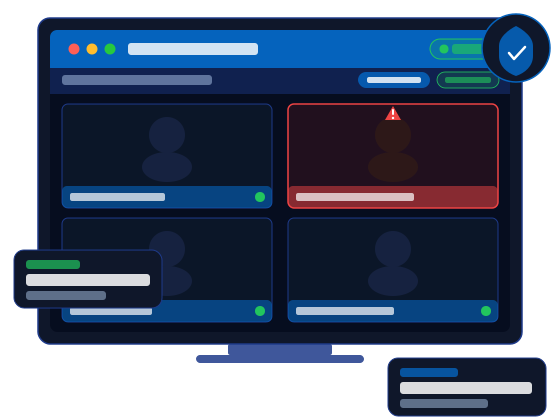
During the attempt, models trained on exam-integrity signals analyse the webcam and microphone feed. When behaviour drifts from the rules you configured (extra faces, leaving the frame, switching tabs, background voices), the system records a timestamped event with supporting stills. Faculty or exam administrators then review only the sessions that triggered flags.
That workflow is what made 12,000 SPPU entrance candidates and 60,000 Natview fellowship sessions feasible without staffing a control room for every screen. AI handles continuous monitoring; humans stay in charge of outcomes.
What AI Proctoring Detects (and What Reviewers See)
Vendor marketing lists vary, but these five signal types cover most institutional exam rules. Use the table below when comparing tools: the difference is not whether AI can “detect cheating,” but how clearly it documents each event for your appeals process.
| Signal | What AI watches | Typical trigger | What reviewers see |
|---|---|---|---|
| Multiple faces in frame | Computer vision counts faces visible to the webcam during the attempt. | A second person enters the camera view or the candidate shares the screen with someone off-camera. | Timestamped still image showing how many faces were detected at that moment. |
| Absence from camera | Whether the candidate remains in frame for the duration of the quiz. | Looking away for notes, leaving the desk, or a poor webcam angle that hides the face. | Event log with duration and a capture from when the absence started. |
| Browser tab movement | Focus changes away from the exam tab while questions are active. | Searching for answers, messaging, or opening reference material in another tab. | Timestamped flag with configurable warnings before the event is logged. |
| Ambient audio | Microphone input for voices or sounds that suggest off-screen coaching. | Someone reading answers aloud or whispering from outside the frame. | Audio event entry alongside visual flags in the same review timeline. |
| Identity at start | Baseline photo capture when the quiz launches, with optional ID upload for higher-stakes settings. | Mismatch between enrolled student and person at the keyboard before questions appear. | Reference still from exam start for comparison during later reviews. |
AI Proctoring vs Live Human Proctoring
Both approaches supervise remote exams. The operational split is who watches continuously and how cost scales with cohort size. Many institutions run a hybrid: AI for volume, humans for flagged or high-stakes sessions.
| Dimension | AI proctoring | Live human proctoring |
|---|---|---|
| Who watches the feed | Software analyses webcam and microphone input continuously during the attempt. | A trained proctor watches a small group in real time and can intervene live. |
| Scale per exam window | High. SPPU ran 2,000+ simultaneous sessions; NFTI processed 60,000 sessions over four months. | Low. Each proctor typically covers a handful of candidates at once. |
| Cost at volume | Lowest when reviewers focus on flagged cases only, not every session. | Highest. Headcount scales linearly with candidate count. |
| False positives | Higher for ambiguous context (family walking behind, poor lighting). Needs human review. | Lower for intent judgement, but fatigue and inconsistency rise over long shifts. |
| Data handling | Event-based logs and stills; ProctorLink stores artefacts on your Moodle server. | Often streams video to vendor cloud unless configured for on-premise retention. |
| Best fit | Frequent quizzes, entrance grids, fellowship programmes, and distributed cohorts. | Regulated finals where accreditors require synchronous human oversight. |
What AI Proctoring Looks Like in Moodle
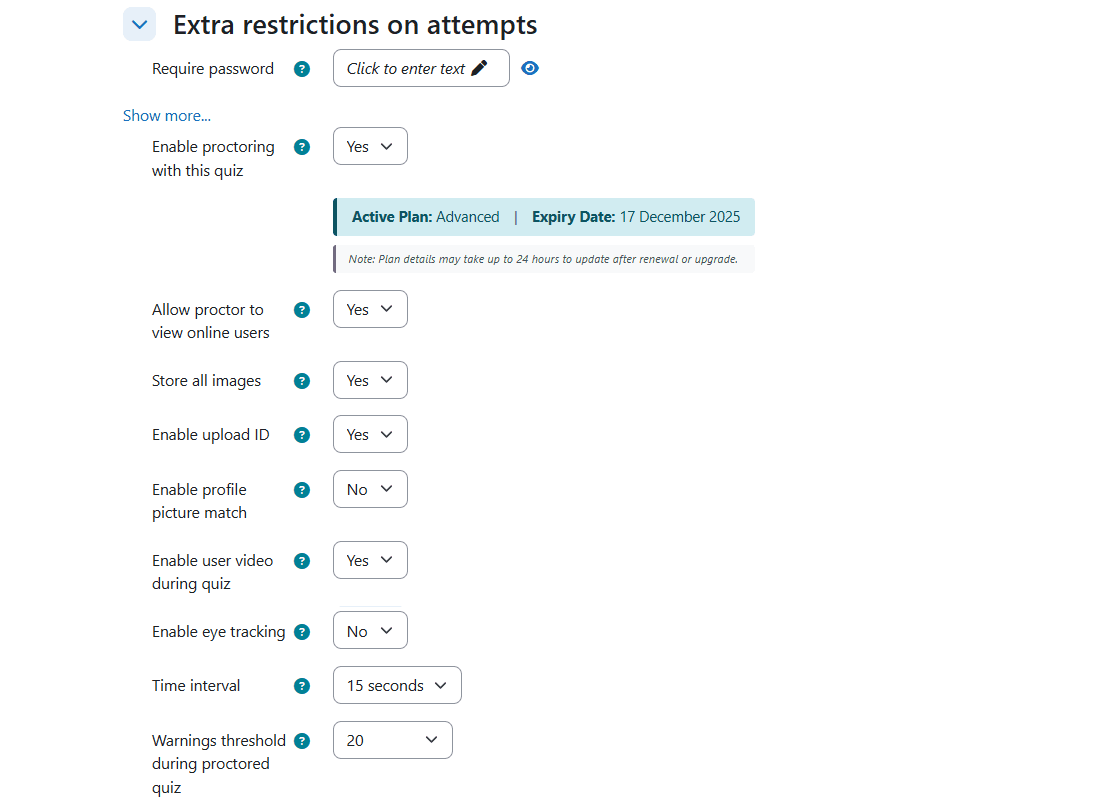
AI proctoring should not force students into a separate vendor portal. With ProctorLink, administrators enable monitoring per quiz inside Moodle, and reviewers work from the same LMS they already use. For a procurement-focused view of Moodle plugins, see Best Moodle proctoring plugin.
Where Institutions Deploy AI Proctoring Today
AI proctoring is no longer experimental. These are deployment patterns from ProctorLink customers:
- State university entrance grids: SPPU delivered 70 PG entrance papers for 12,000 students with 15,205 AI-proctored sessions and 2,000+ candidates online simultaneously.
- Government skills mandates: RT-MSSU combined AI monitoring with on-premise retention to satisfy regulatory compliance without outsourcing student data.
- Self-service fellowship programmes: Natview Foundation ran 60,000 proctored sessions across 36,900 candidates over four months with minimal vendor onboarding.
- Corporate certification tracks: training providers attach AI proctoring to credential exams so remote hires earn the same certificates as classroom cohorts.
Across these deployments, ProctorLink has supported more than one million proctored exam sessions (see published case studies and methodology note below).
What customers say on G2
Institutions evaluating proctoring tools often look for independent feedback outside vendor case studies. ProctorLink is listed on G2, where Moodle administrators and training teams share verified product reviews.
Read ProctorLink reviews on G2 →Frequently Asked Questions
Sources & references
Deployment statistics and product behaviour described in this guide link to the sources below.
- SPPU case study: PG entrance exams at scale
- RT-MSSU case study: government compliance and on-premise retention
- NFTI case study: 60,000 fellowship exam sessions
- All ProctorLink case studies
- ProctorLink Moodle proctoring plugin on moodle.org
- ProctorLink reviews on G2
- ProctorLink Standard user guide (PDF)
- Privacy policy
Explore ProctorLink
Evaluating AI proctoring for your next exam cycle? These pages cover implementation, pricing, and deployment evidence.
Schedule a Demo
30-minute session mapped to your LMS setup, exam calendar, and cohort size.
View Pricing
Subscription tiers for steady exam cycles and credit packs for seasonal peaks.
Case Studies
SPPU, RT-MSSU, and NFTI: numbers, timelines, and what broke before it worked.
Moodle Integration
quizaccess_quizproctoring plugin. Typical go-live in one to two business days.
University Solutions
Concurrency, faculty review workflows, and integrity at entrance-exam scale.
Certification Exams
AI proctoring for credential programmes without physical test centres.
More Proctoring Guides
What is Online Proctoring?
Online proctoring supervises remote exams via webcam and microphone inside your LMS, logging rule violations with timestamps so reviewers judge flagged cases, not every session.
Best Moodle Proctoring Plugin
A comparison of leading Moodle proctoring plugins for universities that need native LMS integration, AI monitoring, and institution-owned data.
Online Proctoring Software for Universities
How university exam offices choose online proctoring software for entrance grids, finals, and multi-faculty calendars, including stakeholder RFPs and centre-vs-online cost tradeoffs.
Online Proctoring Software for Certification Exams
How certification bodies and training providers use online proctoring for identity proofing, item-bank protection, and defensible, audit-ready credentialing exams.
AI Proctoring vs Live Proctoring
A side-by-side comparison of AI proctoring and live human proctoring for cost, scale, accuracy, and exam security.
How to Prevent Cheating in Moodle Exams
Practical steps to reduce cheating in Moodle quizzes using proctoring settings, question banks, timing controls, and AI monitoring.
Moodle Proctoring Plugin Comparison
Feature-by-feature comparison of Moodle proctoring plugins covering integration, AI detection, pricing, and data storage.
Online Exam Proctoring in India
A guide to online exam proctoring for Indian universities and certification providers, including compliance, pricing in INR, and local case studies.
Proctoring SDK vs API vs LMS Plugin: Which Do You Need?
How to choose between a proctoring LMS plugin, a browser SDK, and a REST API when adding proctoring to software you already own, with a decision guide and code examples.
How to Add Proctoring to a Web Application
A step-by-step guide to adding exam proctoring to a web app you own: mint a session on your backend, run the browser SDK, and read a server-side integrity report, with code from the API reference.
What Browser-Based Proctoring Can and Cannot Detect
What browser-based proctoring can detect (tab switches, clipboard, faces, identity) and what it cannot (phones, a second monitor, a virtual machine), and why the tiering exists.
How to Add Proctoring to a React Assessment App
A step-by-step guide to adding exam proctoring to a React app: mint a session on your backend, wrap the browser SDK in a useEffect hook, handle StrictMode and token expiry, and read a server-side integrity report.
How to Add Proctoring to an Angular Exam Portal
A step-by-step guide to adding exam proctoring to an Angular app: mint a session on your backend, hold the browser SDK in an injectable service, start it in ngOnInit and tear it down in ngOnDestroy, handle NgZone and token expiry, and read a server-side integrity report.
LTI 1.3 Proctoring Integration, Explained for Developers
How LTI 1.3 connects a proctoring tool to your LMS: the OpenID Connect launch handshake, why it replaces LTI 1.1 shared secrets, how it compares to a Moodle plugin and the browser SDK, and how to read the same server-side integrity report.
Scale Exam Integrity Without Scaling Headcount
ProctorLink runs AI proctoring inside Moodle, keeps flagged evidence on your servers, and leaves outcomes to your faculty.